





Pause and resume are available to all users for a limited time.We’re still actively testing and improving persistence behavior and performance, so details may change. Review the current limitations.
Sandbox state transitions
Understanding how sandboxes transition between different states is crucial for managing their lifecycle effectively. Here’s a diagram showing the possible state transitions: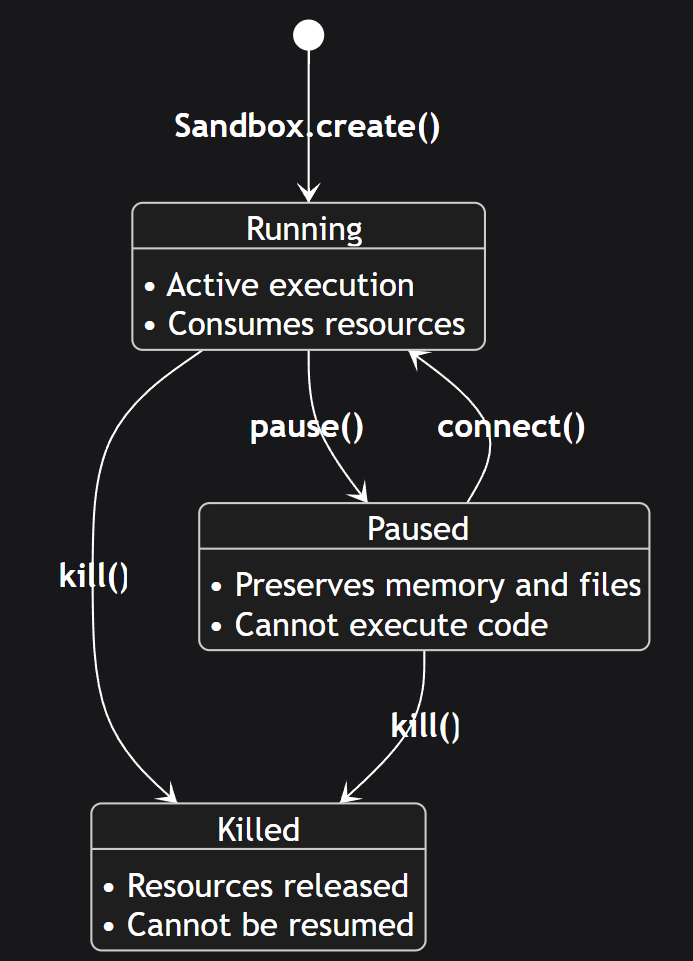
State descriptions
- Running: The sandbox is actively running and can execute code. This is the initial state after creation.
- Paused: The sandbox execution is suspended but its state is preserved.
- Killed: The sandbox is terminated and all resources are released. This is a terminal state.
Changing sandbox’s state
Pausing sandbox
When you pause a sandbox, both the sandbox’s filesystem and memory state will be saved. This includes all the files in the sandbox’s filesystem and all the running processes, loaded variables, data, etc.Resuming sandbox
When you resume a sandbox, it will be in the same state it was in when you paused it. This means that all the files in the sandbox’s filesystem will be restored and all the running processes, loaded variables, data, etc. will be restored.Listing paused sandboxes
You can list all paused sandboxes by calling theSandbox.list method and supplying the state query parameter.
More information about using the method can be found in List Sandboxes.
Removing paused sandboxes
You can remove paused sandboxes by calling thekill method on the Sandbox instance.
Sandbox’s timeout
When you connect to a sandbox, the sandbox’s timeout is reset to the default timeout of an E2B sandbox - 5 minutes. You can pass a custom timeout to theSandbox.connect()/Sandbox.connect() method like this:
Auto-pause
Auto-pause is configured in the sandbox lifecycle on create. SetonTimeout/on_timeout to pause.
.kill(), the sandbox is permanently deleted and cannot be resumed.
For auto-resume behavior, see AutoResume.
Network
If you have a service (for example a server) running inside your sandbox and you pause the sandbox, the service won’t be accessible from the outside and all the clients will be disconnected. If you resume the sandbox, the service will be accessible again but you need to connect clients again.Current limitations (subject to change)
Pause and resume performance
- Pausing a sandbox takes approximately 4 seconds per 1 GiB of RAM
- Resuming a sandbox takes approximately 1 second
Continuous runtime limits
- A sandbox can remain running (without being paused) for:
- 24 hours on the Pro tier
- 1 hour on the Base tier
- After a sandbox is paused and resumed, the continuous runtime limit is reset